I don’t know guys why you are not serious about your clients, I feel like you only care about brokerage that you earn from our trades and you are thinking that what does it matters when we charge small amount of 20₹. Who cares about that, people now a days spend it in unnecessary things. So if we launch some buggy feature nobody will get hurt by it.
We are not paying only ₹20 brokerage, but lakhs at the end of every year. So be serious about your product.
Before launching new feature please spend at least real money on that feature by trading on real time. Why we need to spend our money to inform you about bugs?
After launching new Order form, I can’t open order form when instant order is enabled. It is placing order at market price?
Why create new order places order at market price directly?
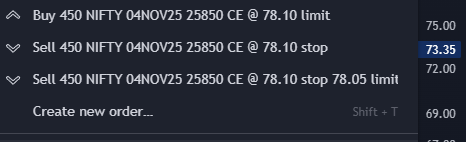
Even after order is executed you can’t place stoploss order as executed order has different product type then specified product type in user settings.
Tried to place order with new form, with SL and Target, but here once order gets executed you can’t modify your SL. Which means once order gets executed you can’t trail SL manually, you need to stick to your SL and target.
Because of these bugs I need to pay from my pocket. And this is happening on every time when new feature is being introduced.
I am sorry for my flippant, derogatory post but I don’t have other option, I need to bear losses because of your mistakes.
I’ve not created any ticket for this. I’ve reported it here. And I don’t have screenshot for this. You can check logs in my account. And also you can place order and check the bug itself as I am not going to place any order and bear losses to just show you screenshot.
For this issue, Please spend some real money by taking placing Limit order with SL and Target, once order gets executed, try to modify SL when CMP comes below entry price.
Please add up/down arrow in qty also to quick modify same as added in price.
Check below video, I have enabled instant order placement then why it is opening order modification window for GTT orders? Also it is taking 20-30 seconds to modify price and qty both at a time.
Instant orders via GTT are not enabled yet. Any GTT order will always open the Custom Order Form. Once the second update is live, that includes Trade From Charts and full capabilities of instant order, it’ll be available then.
Employee reporting new bug sir. I know solving reported bugs at Upstox is least priority task for you but hoping some future fooled traders gets benefit of this, if this is solved otherwise we are always ready for enjoying launch of new broken feature again and again.
@MohitGolecha Can you please explain why this error is showing for TSL? CMP is 94. I want to buy above 185 with Stoploss 180 and TSL 1. Why I need to enter minimum 8.6 TSL? Don’t you think TSL value should be dependant on Entry price and Stoploss instead of CMP and StopLoss?
Also Can you please add MPP% value in user settings instead of static 4% we should be able to modify it as per our requirement. and can you please explain use of MPP over Primary, SL and TP?
Regarding Trailing Stop Loss (TSL): Currently, the Trailing Gap is calculated as a minimum of 10% of the difference between the LTP (Last Traded Price) and the SL price. This guardrail is in place to prevent overly aggressive trailing that could trigger prematurely due to minor market fluctuations.
However, your point about GTT orders is a great catch. Using the Entry Price instead of the CMP (Current Market Price) for GTT calculations is a very valid use case. We have added this to our product roadmap for implementation.
Regarding MPP (Market Price Protection): To clarify, the MPP values are not static at 4%. They are dynamic and defined via a configuration based on the specific instrument and its price range (you can find the detailed breakdown in our MPP Guide here).
The purpose of applying MPP to all order legs (Primary, SL, and TP) is to create a buffer range. This ensures that once your order is triggered, it executes within a protected price band, improving execution and also shielding you from extreme slippage or unfavorable fills in volatile markets.